
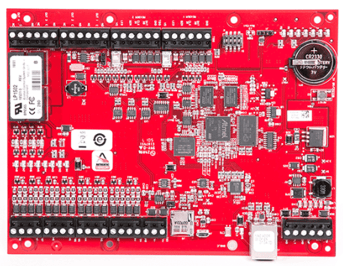
This article covers how to access a Mercury MP1502 or LP4502 controller's built-in web page, factory default the board, and read its status LEDs.
Note: SOON: You don't need to update firmware by hand. Alocity updates controller firmware automatically.
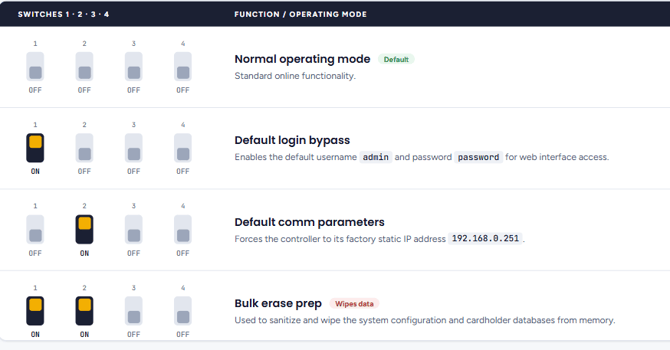
1. Access the Controller's Web Page with the DIP Switches
If you're locked out or don't know the IP address, use the DIP switches to force the board into a known state:
- DIP 1 ON: forces the default login (admin / password). Takes effect immediately, without a reboot.
- DIP 2 ON: forces the default IP address, 192.168.0.251 (subnet 255.255.0.0). Takes effect after a power cycle.
To use both:
- Remove power from the board.
- Set DIP 1 and 2 ON, and DIP 3 and 4 OFF.
- Apply power.
- Set your laptop's IP address to 192.168.0.100 (subnet 255.255.0.0) and connect it directly to the controller's Ethernet port.
- Open a browser and go to http://192.168.0.251.
- Log in with username admin and password password.
Note: Return all DIP switches to OFF when you're finished. If login fails, switch DIP 1 off and on again to reset the login timer. On a network with DHCP, the address may be different.
2. Factory Default (Bulk Erase)
A bulk erase wipes the board's database and network settings. Timing matters, so read all the steps first.
- Power down. Set all DIP switches OFF, then remove power from the board, including any battery backup.
- Set the switches. DIP 1 and 2 ON, DIP 3 and 4 OFF.
- Apply power. LED 1 stays on for about 15 seconds while the board boots.
- Watch for alternating flashes. LEDs 1 and 2 flash together, then LEDs 3 and 4, repeating about every half second.
- Trigger the erase. Within 10 seconds of the alternating pattern starting, switch DIP 1 and DIP 2 OFF.
- Wait for the wipe. LED 2 flashes rapidly while the memory is erased. This can take up to 60 seconds.
- Reboot. LEDs 1 and 4 flash briefly, then the board restarts in its factory default state.
3. Controller LEDs
| LED | Meaning |
|---|---|
| LED 1 | Heartbeat. Mostly off (20% on) = offline from the host. Mostly on (80% on) = online with the host. |
| LED 2 | Flashes with Ethernet (host) communication. |
| LED 3 | Flashes with RS-485 sub-panel bus activity. |
| Others | See the board's user manual. |
When the controller is ready, continue to 6. Adding a Mercury Controller to Alocity.
For questions or assistance, please contact your account manager or email support@alocity.com.